

When a ticket goes wrong — a blown deadline with no obvious culprit, a piece of information that disappeared, a disputed decision — the question is always the same: what actually happened? Answering with fragments from different systems is the path to argument. The Traceability feature of Nyverra Portal ITSM answers with a single timeline.
This guide explains what the module delivers, why it unifies audit and history, and how to use it in investigation and compliance.
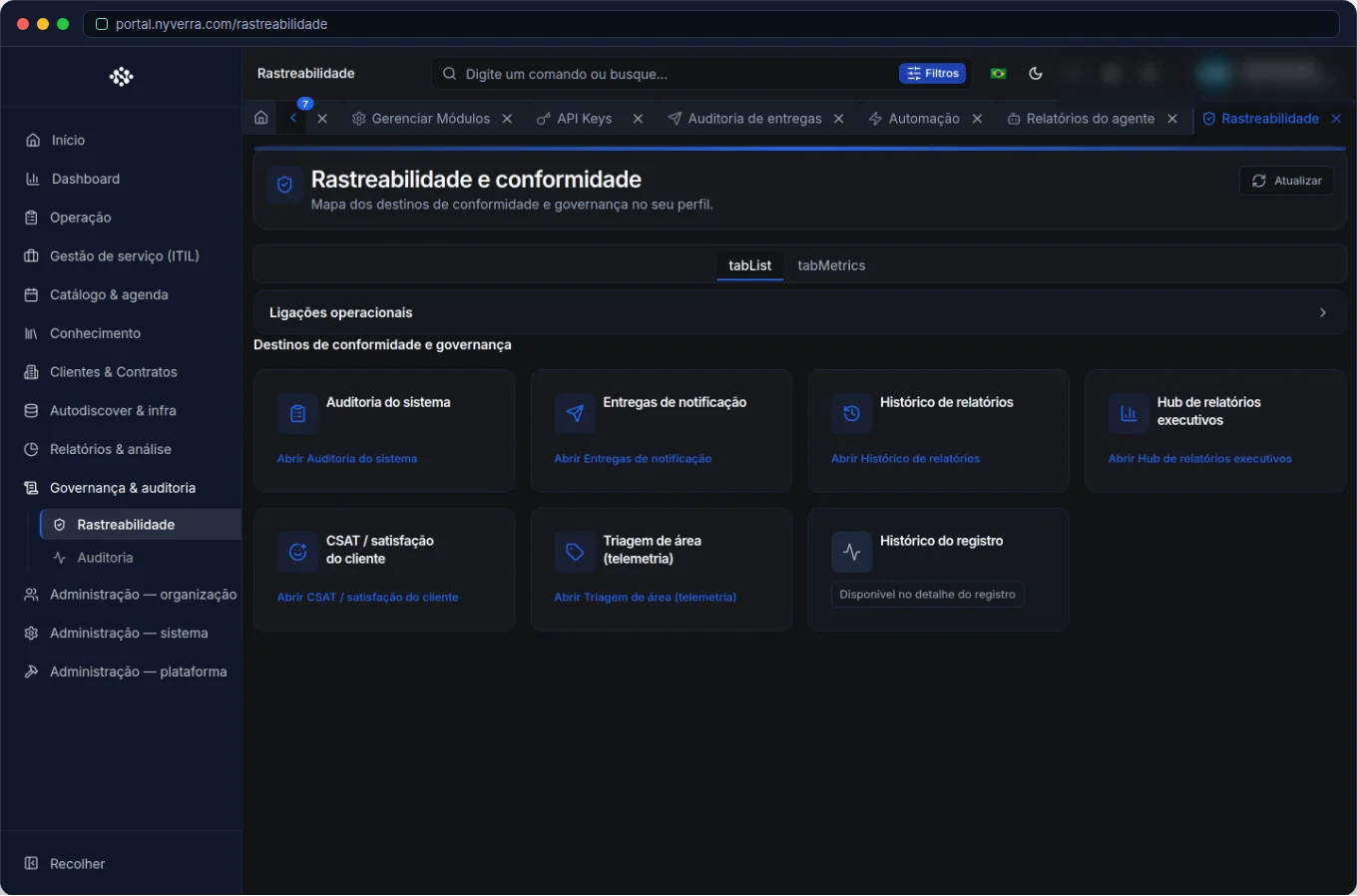 Module interface in Nyverra Portal ITSM.
What Is Traceability
It is the unified view that combines two types of records that usually live separately:
| Record | What it provides |
|---|---|
| Audit | Actions in the system: who changed/approved/deleted and when |
| Ticket history | Creation, assignments, transitions, status changes |
Alone, the two views tell half the story. Together, they form the single timeline of a ticket — the complete “movie,” not scattered snapshots.
Why This Changes the Investigation
- Root cause: reconstruct the order of events to understand what went wrong.
- Complaints: show, with date and author, what was done and when.
- Compliance: ISO 20000 and LGPD require traceability of actions on data and controls.
- Continuity: whoever takes over the case sees all previous context.
Who Uses It
| Profile | Typical use |
|---|---|
| Manager / operations | Investigate a specific ticket from start to finish |
| Quality / compliance | Prove compliance and support audits |
| Support | Resume context of a complex case |
How to Use: Step by Step
- Open the Traceability view of a ticket (or resource).
- Navigate the timeline — creation, assignments, transitions, approvals, status.
- Identify who did what and when.
- Use it in root cause analysis of problems and complaints.
- Export evidence when requested by an audit.
Best Practices
- Standardize records (clear transitions, informed reasons): traceability depends on the quality of what is recorded.
- Use internal notes for technical context and public replies for communication — the timeline reflects both.
- Combine traceability (case-by-case) with reports (macro view).
- Keep the retention policy aligned with LGPD and ISO 20000.
- Use it in post-incident reviews (post-mortem) to learn from the past.
Business Rules and Considerations
| Point | Explanation |
|---|---|
| Source | Combines audit and history; coverage follows the system's log policy. |
| Confidentiality | Internal notes appear in traceability, but not to the customer. |
| Access | Restrict to those with legitimate reason to investigate. |
| Retention | Define how long the trail is kept. |
Common Mistakes
| Situation | What to do |
|---|---|
| Vague transitions | Guide the team to record the reason — the timeline is only as good as the data. |
| Looking for data reads | Not every read is logged; focus on change actions. |
| Access too broad | Restrict it — it is sensitive governance information. |
Frequently Asked Questions
Is it the same as audit?
It goes further: it unifies audit with the ticket's own history.
Does the customer see everything?
No — internal notes remain restricted to the team.
Is it useful for post-incident?
Yes, it is an ideal basis for post-mortem and continuous improvement.
Automate via API
Traceability and ticket history resources are exposed via API (/api/rastreabilidade, /api/tickets/{id}/historico). Reference at developer.nyverra.com.
Use Cases: Reconstructing the Story
1. Customer complaint. The customer claims they were not notified. The timeline shows each transition, with date and author — the conversation moves from “I think” to fact.
2. Incident post-mortem. After a major incident, the team reconstructs the sequence: who noticed, when they acted, what changed. It is the basis for correcting the process and preventing recurrence.
3. Service audit. An auditor wants to see how a critical case was handled. Traceability delivers the complete movie, audit and history, in one place.
KPIs and Use
| Point | Benefit |
|---|---|
| More accurate root cause | Less assumption, more fact |
| Complaints resolved with data | Less conflict |
| Systematic post-mortem | Organizational learning |
| Audit evidence | Compliance |
Trail Quality Depends on You
Traceability does not fix vague records. If transitions say “ok” or “done,” the timeline helps no one. The investment is in a recording culture: reason informed on transfer, context in the transition, documented decision. With discipline, Nyverra Portal ITSM turns traceability into what it should be: proof of the process and the map to improve it.
Traceability Checklist
- Standardize transition recording.
- Inform reason on transfers.
- Define retention policy.
- Restrict access.
- Use in incident post-mortems.
- Combine with audit and reports.
Additional Frequently Asked Questions
Why is my timeline poor?
Because the records are vague; quality depends on what is written.
Does the customer see everything?
No; internal notes remain restricted to the team.
Is it useful for audit?
Yes, it is a basis for evidence.
Conclusion
Traceability is proof that the process worked — or the map to correct it. By unifying audit and history into a single timeline, Nyverra Portal ITSM gives operations the clarity that investigation, audit, and continuous improvement require.
Keep reading
Read also

StorCLI - Complete Cheat Sheet
StorCLI is the official and modern tool for managing Broadcom/LSI RAID controllers. This guide covers essential commands, syntax and use cases.
12 min de leitura Portal ITSM
Business Services in Nyverra Portal: Translating IT into Business
The business doesn't feel a server go down — it feels email stop. The Business Services (Service Mapping) module of Nyverra ITSM Portal connects services like Email, ERP or PACS to CMDB assets, revealing the real impact of each failure.
5 min de leitura Segurança
RPO vs RTO: How to Define Before Buying Backup (and Why Most Companies Get It Wrong)
Most companies buy backup asking the wrong question: "how much does it cost?". The right question is: how much data can I lose (RPO) and how long can I be down (RTO). Discover how to define these numbers per system and avoid purchasing protection based on price, not on real need.
9 min de leitura
Comments
No comments yet
Be the first to share your thoughts on this article.

Leave a comment