

There is a silent trap in every service desk: resolving the same incident ten times and calling it productivity. Each recurrence is wasted time, consumed SLA, and a worn-out customer — when the root cause remains intact. That is why problem management exists.
This guide explains how the Problems module of Nyverra ITSM Portal transforms recurring incidents into structured investigation: grouping, root cause analysis (RCA), workarounds, Known Error Database (KEDB), and forwarding the definitive correction to Changes.
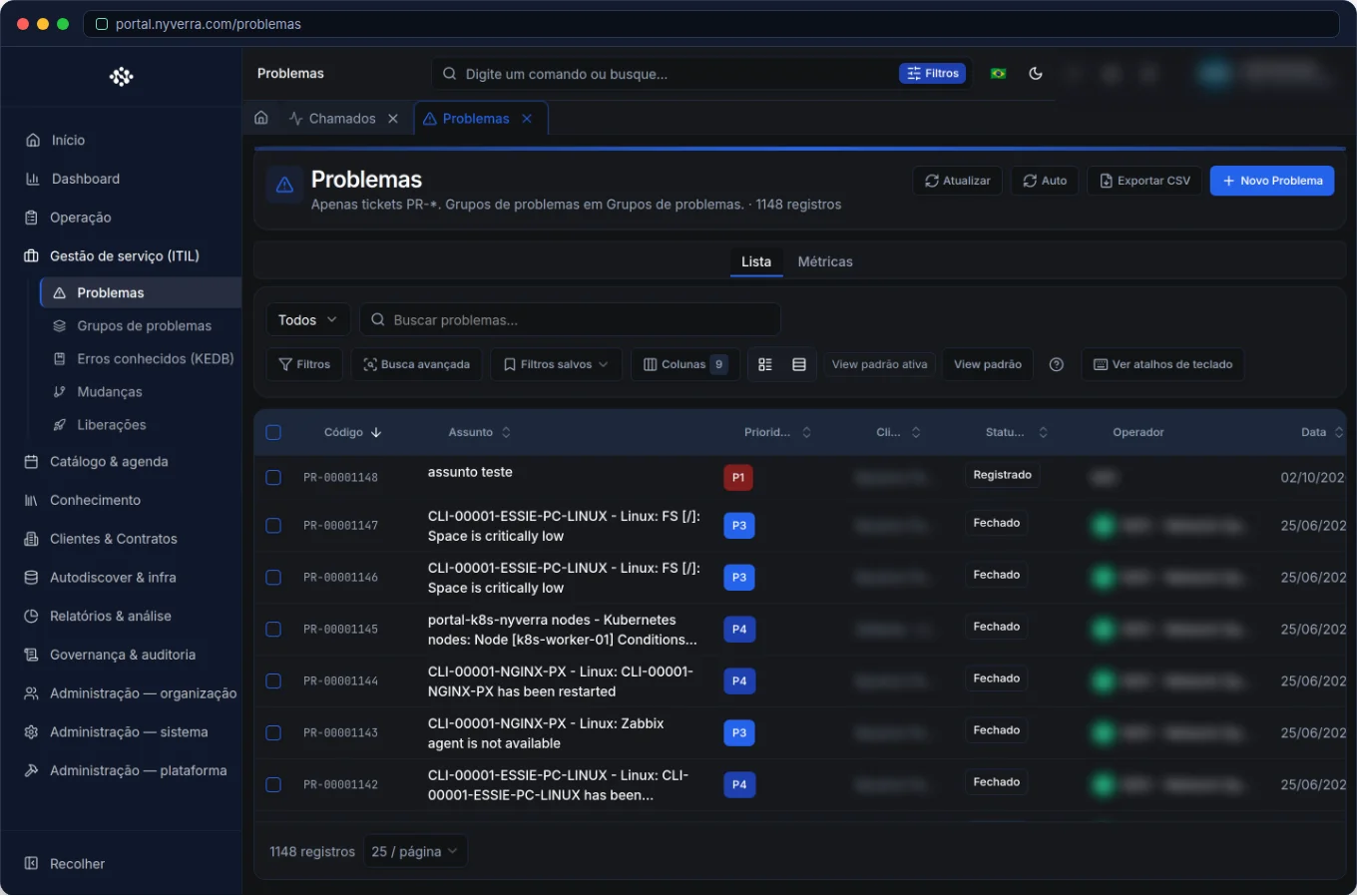 Interface of the module in Nyverra ITSM Portal.
A Problem Is Not an Incident
Confusing the two concepts is the most common mistake — and the most expensive. The distinction, defined by ITIL, is straightforward:
| Incident | Problem | |
|---|---|---|
| Objective | Restore service as soon as possible | Eliminate the root cause |
| Focus | The visible symptom now | The “why” behind the symptoms |
| Horizon | Immediate | Investigation over time |
| Metric | Resolution time | Eliminated recurrence |
A problem (ticket PR-) is the investigation unit that groups several incidents with the same symptom. It is not “a more important ticket” — it is another discipline, with its own lifecycle.
When to Open a Problem
Not every failure deserves a formal investigation. Open a problem when there are signs of recurrence or broad impact:
- The same incident reappears at regular intervals.
- A failure affects multiple users, services, or assets at the same time.
- There is significant risk or cost and nobody knows the cause.
- A major incident required disproportionate effort to be circumvented.
A good heuristic: if you can point to two or more tickets with the same symptom, there is probably a problem waiting to be created.
Who Uses It
| Profile | Typical use |
|---|---|
| Technician / 2nd and 3rd line | Investigate, register RCA and apply workarounds |
| Service manager | Prioritize problems, demand analysis and approve corrective changes |
| Operations / NOC | Link incidents to known problem groups |
| Customer | Generally does not access this area |
Module Features
Problem Groups
They are the “case” that brings together the investigation: a multidisciplinary team, the problems linked to it, and the associated incidents. Instead of each analyst investigating in isolation, the group concentrates effort and evidence. The Portal allows creating groups, managing members, correlating incidents, and tracking recurrences and investigation tasks.
RCA — Root Cause Analysis
It is the heart of the module: the structured record of hypotheses, evidence, and the confirmed root cause. A well-done RCA answers not only “what failed,” but “why it failed” and “why it was not detected earlier.” It is this document that supports the decision to correct definitively.
Impact Analysis
Connects the problem to the assets (CMDB) and affected business services. Thus priority ceases to be subjective: you see the real scope of the failure — how many customers, which services, what criticality.
Workarounds
The cause is not always known on day 1. The workaround is the documented workaround solution — a palliative that restores service while the definitive correction does not exist. Well-written workarounds relieve immediate service and prevent each technician from “reinventing” the workaround.
KEDB — Known Error Database
The KEDB (Known Error Database) is the catalog of already diagnosed errors, with symptom, cause, and workaround. When an incident arrives, the operation consults the KEDB and applies the known workaround in seconds. It is the asset that transforms individual knowledge into collective capability.
Link with Changes
The investigation only ends when the cause is eliminated. The problem is linked to a change (RFC) that implements the definitive correction, closing the ITIL cycle: incident → problem → change.
How to Use: The Flow in Practice
- Identify recurrence: note incidents with the same symptom in the same service or asset.
- Create the problem: register a
PR-describing symptoms and impact. - Link incidents: associate related tickets to the problem/group — they become evidence.
- Investigate and document RCA: record hypotheses, tests, and root cause.
- Publish the workaround: put the workaround in the KEDB and knowledge base for immediate use.
- Forward the correction: link a change and track until implementation.
- Close the problem when recurrence is eliminated and validate with indicators.
Business Rules
| Rule | Explanation |
|---|---|
| Problem ≠ ticket | Ticket is the user's request; problem is the management of the cause. |
| Links | An incident can be linked to a problem; reports show the set. |
| Change | The structural correction usually generates a record in Changes. |
| Permission | Who does not see Problems in the menu should not access the URL directly (RBAC). |
Best Practices
- Prioritize problems by impact × number of linked incidents, not by “who shouted loudest.”
- Document the workaround even without known root cause — it already generates immediate value.
- Promote recurring and known errors to the KEDB to speed up first response.
- Periodically review problems without activity and without defined deadline.
- Link each problem to the asset in the CMDB to reveal patterns by equipment.
Common Mistakes
| Situation | What to do |
|---|---|
| Turning every incident into a problem | Reserve the module for recurrence/impact; simple incidents are resolved as tickets. |
| RCA “black box” | Document hypotheses and evidence, not just the conclusion — future audit will thank you. |
| Problem open forever | Define deadline and owner; without that, the investigation cools off. |
Frequently Asked Questions
Does problem management replace user support?
No. The incident continues to be resolved normally; the problem runs in parallel, attacking the cause.
Do I need root cause to create a problem?
No. You can start with symptoms and workaround; RCA is the product of investigation, not the prerequisite.
Where does the customer see the workaround?
The workaround can be published in the knowledge base and used in service procedures.
Automate via API
The module's features are available via REST API (/api/problema-grupos, /api/problema-rca, /api/problema-tarefas, /api/workarounds, /api/kedb), allowing integration of problem management with other tools. The reference is at developer.nyverra.com.
Use Scenarios: Where Problem Management Comes In
1. VPN goes down every day at 9 a.m. The queue receives, over two weeks, dozens of tickets “can't connect”. Instead of resolving one by one, the operation creates a problem, links the incidents, and investigates the pattern: the peak coincides with the overnight backup still running. The RCA points out the cause; a workaround (reschedule the backup) alleviates immediately; a change corrects definitively.
2. A department's printer fails for weeks. The same equipment generates recurring tickets. The problem is linked to the asset in the CMDB — and the analysis shows that the model is at the end of its useful life. The decision changes from “repair again” to “replace”, with data to justify the investment.
3. Instability after deploy. A service degrades every time a nightly routine runs. The problem connects incidents, RCA, workaround, and the change that adjusts the routine — closing the full ITIL cycle.
How to Measure Problem Management
| Indicator | What it reveals |
|---|---|
| Incidents linked per problem | The scale of recurrence |
| Time to RCA | Speed of diagnosis |
| Problems with published workaround | Immediate relief while correcting |
| Recurrence before/after | Effectiveness of the definitive correction |
| Problems without activity | Forgotten investigations |
These numbers shift the IT conversation with the business: instead of “we resolved X tickets”, it becomes “we eliminated the cause of Y% of recurrences.”
Integration with the Ecosystem
Problem management gains strength when connected: monitoring (Zabbix) feeds incidents that reveal patterns; the CMDB shows where the problem lives; the Downtime Manager avoids false alerts during investigation; and the Changes module implements the correction. Closing this cycle within a single system is what prevents the investigation from becoming folklore and the correction never arriving.
Conclusion
Problem management is what separates a reactive operation from a learning operation. With problem groups, RCA, workarounds, and KEDB integrated with the CMDB and changes, the Nyverra ITSM Portal reduces failure recurrence, frees the team from rework, and raises the service desk maturity — exactly what ITIL and ISO 20000 frameworks require.
Keep reading
Read also

StorCLI - Complete Cheat Sheet
StorCLI is the official and modern tool for managing Broadcom/LSI RAID controllers. This guide covers essential commands, syntax and use cases.
12 min de leitura Portal ITSM
Business Services in Nyverra Portal: Translating IT into Business
The business doesn't feel a server go down — it feels email stop. The Business Services (Service Mapping) module of Nyverra ITSM Portal connects services like Email, ERP or PACS to CMDB assets, revealing the real impact of each failure.
5 min de leitura Segurança
RPO vs RTO: How to Define Before Buying Backup (and Why Most Companies Get It Wrong)
Most companies buy backup asking the wrong question: "how much does it cost?". The right question is: how much data can I lose (RPO) and how long can I be down (RTO). Discover how to define these numbers per system and avoid purchasing protection based on price, not on real need.
9 min de leitura
Comments
No comments yet
Be the first to share your thoughts on this article.

Leave a comment