

No ITSM works alone. Alerts come from monitoring, conversations arrive via WhatsApp, login comes from the corporate directory, notifications go out by email. The Integrations module of the Nyverra ITSM Portal is what connects the portal to the rest of the IT ecosystem.
This guide covers the main integrations, what each enables, and how to validate them safely.
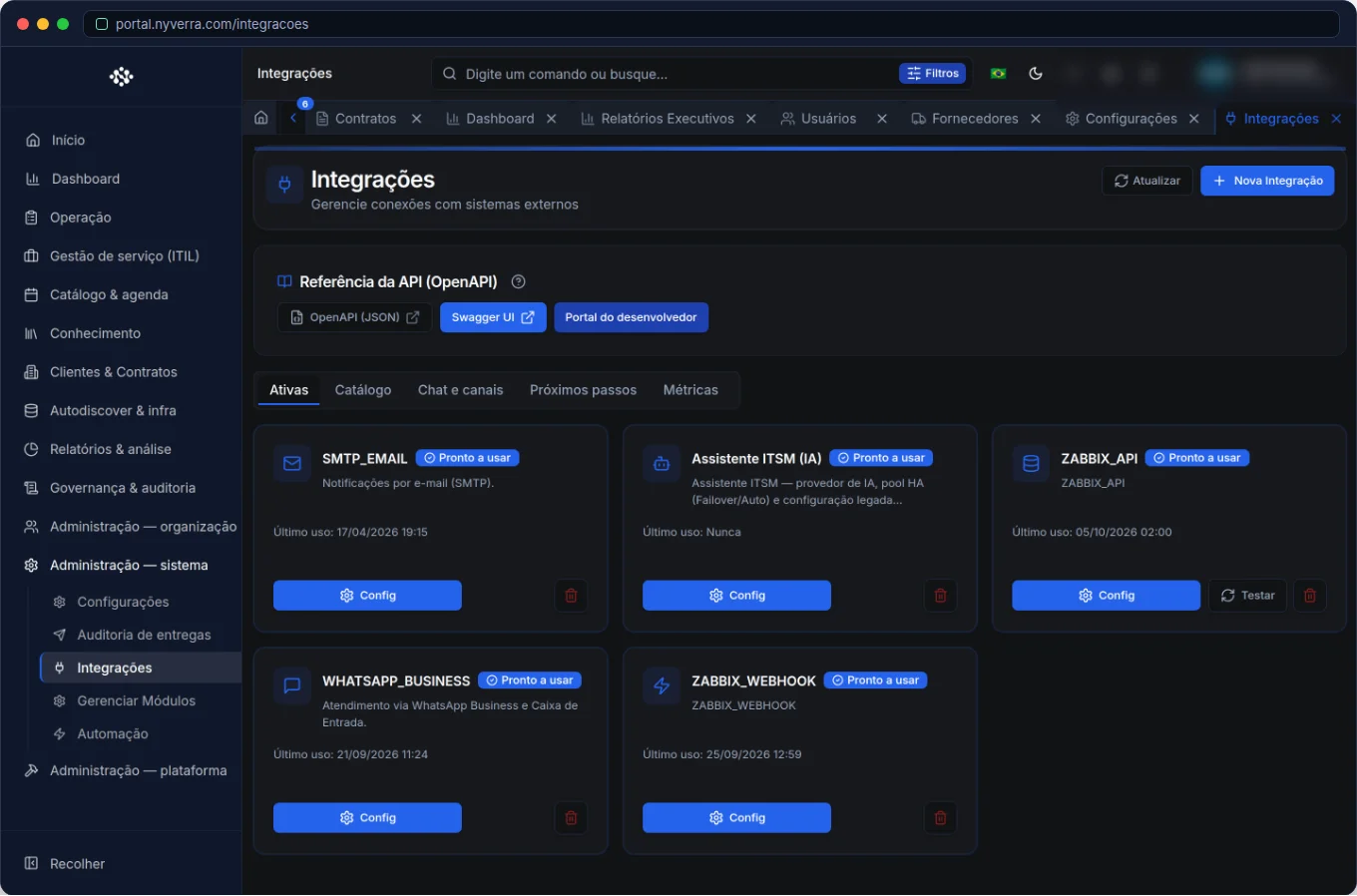 Module interface in the Nyverra ITSM Portal.
What the module covers
| Integration | Purpose |
|---|---|
| Zabbix | Alerts create or update tickets; host autodiscovery |
| WhatsApp (Meta) | Operational inbox — see WhatsApp |
| LDAP / SAML / OAuth2 | Corporate login (SSO) and provisioning |
| Email (SMTP) and webhooks | Notifications and automations |
Zabbix: from alert to ticket
This integration reduces manual work the most. When monitoring detects a problem, the Portal receives the event (via webhook) and creates or updates a ticket — with host, severity, and context. The flow is resilient: ingestion is asynchronous (receiving + processing phases), preventing event loss during peaks. Combined with Downtime Manager, it prevents alerts during maintenance.
WhatsApp: service in the channel customers use
Integration with Meta's API enables the WhatsApp Inbox inside the portal: conversations become service interactions, with accept, transfer, close, and link to ticket. It enforces Meta's 24-hour window rule — outside it, free-form text is blocked and a template is used (“resume contact”).
LDAP / SAML / OAuth2: corporate identity
Instead of isolated passwords, the portal uses the company's identity. This centralizes access (who comes in and who leaves), reduces passwords, and improves auditing. Coordinate with the identity team before enabling in production.
Email and webhooks
- SMTP: sending notifications and reports; test the configuration before enabling at scale.
- Webhooks: inbound/outbound events for automations and other tools.
Who uses it
| Profile | Use |
|---|---|
| Administrator | Configure credentials, webhooks, and test connections |
| Infra / NOC | Monitoring integration (Zabbix) |
| Identity team | SSO (LDAP/SAML/OAuth2) |
How to use: step by step
- Choose the integration and gather credentials (e.g., in Zabbix, the webhook endpoint; in Meta, Phone Number ID and token).
- Configure in the Integrations area.
- Use the connection test to validate.
- Define rules/routing (groups that receive events/conversations).
- Monitor received events and adjust.
Business and security rules
| Rule | Explanation |
|---|---|
| Maintenance window | Changing a production integration requires a window and testing — it can affect the service. |
| Secrets | Integration credentials are sensitive; use a vault and rotate them. |
| Inbound webhook | Protect the endpoint (token/key) to prevent false events. |
| Idempotency | Monitoring events must be handled to avoid duplicate tickets. |
Best practices
- Start with one critical integration (usually Zabbix) and expand.
- Always test before enabling in production.
- Combine Zabbix + Downtime Manager to avoid false alerts during maintenance.
- Use dedicated keys/tokens and rotate them periodically.
- Document what each integration sends and where — it makes troubleshooting easier.
Common issues
| Situation | What to do |
|---|---|
| Duplicate tickets from monitoring | Adjust event mapping/idempotency. |
| Email doesn't go out | Test SMTP; check delivery audits. |
| WhatsApp conversations without an owner | Configure escalation groups that receive the queue. |
| SSO failure | Review LDAP/SAML configuration and metadata with the identity team. |
Frequently asked questions
Do I need all integrations?
No — enable as needed. Zabbix is usually first because of monitoring.
Can I test before rolling out to everyone?
Yes, the area offers connection testing; in production, use a maintenance window.
Is inbound webhook secure?
Protect it with token/key and validate the source.
Automate via API
Integrations and webhooks are exposed via API (/api/integracoes, including inbound webhooks and Slack/WhatsApp). Reference at developer.nyverra.com.
Use cases: the connected ecosystem
1. Zabbix generating tickets. A host goes down; monitoring sends the event; the Portal creates the ticket with host and severity. The NOC stops opening tickets manually and starts triaging what arrives — reducing detection time.
2. Maintenance without false alerts. The change brings down a service; Downtime Manager suppresses alerts for that window. Without integration, planned maintenance would turn into dozens of false incidents.
3. Corporate single sign-on. With SSO (LDAP/SAML/OAuth2), the employee uses the company identity. Offboarding in the directory immediately revokes portal access — centralized security.
4. Conversations on WhatsApp. The customer communicates through the channel they already use; the operator serves them inside the portal, linking the conversation to a ticket.
Integration security
| Risk | Mitigation |
|---|---|
| Leaked secrets | Secrets vault + rotation |
| False events on webhook | Token/key + source validation |
| Duplicate tickets | Idempotency in ingestion |
| Breakage in production | Testing + maintenance window |
Troubleshooting that saves hours
When something “doesn't arrive,” the investigation follows an order: (1) is the integration active? (2) does the connection test pass? (3) do events appear on the source side? (4) did the notifications go out (delivery audit)? Documenting what each integration sends and where dramatically shortens this path. Integration is what makes ITSM work networked — but it requires secrets governance and testing.
Integration checklist
- Gather credentials and source endpoints.
- Configure in the Integrations area.
- Run the connection test.
- Define destination groups and rules.
- Monitor received events.
- Protect secrets and plan rotation.
Additional frequently asked questions
Duplicate ticket from monitoring: what to do?
Adjust the mapping/idempotency of source events.
Can I activate everything at once?
It is not recommended; start with the critical integration and validate.
How to protect the inbound webhook?
With token/key and source validation.
Conclusion
Integrations turn the Nyverra ITSM Portal into an IT ecosystem hub. Connected monitoring, messaging, and identity mean less manual work, faster response, and an operation that communicates with itself.
Keep reading
Read also

StorCLI - Complete Cheat Sheet
StorCLI is the official and modern tool for managing Broadcom/LSI RAID controllers. This guide covers essential commands, syntax and use cases.
12 min de leitura Tutoriais
Business Services in Nyverra Portal: Translating IT into Business
The business doesn't feel a server go down — it feels email stop. The Business Services (Service Mapping) module of Nyverra ITSM Portal connects services like Email, ERP or PACS to CMDB assets, revealing the real impact of each failure.
5 min de leitura Segurança
RPO vs RTO: How to Define Before Buying Backup (and Why Most Companies Get It Wrong)
Most companies buy backup asking the wrong question: "how much does it cost?". The right question is: how much data can I lose (RPO) and how long can I be down (RTO). Discover how to define these numbers per system and avoid purchasing protection based on price, not on real need.
9 min de leitura
Comments
No comments yet
Be the first to share your thoughts on this article.


Leave a comment