

A portal with too many menus is a portal nobody adopts. The temptation to turn everything on "just in case" usually has the opposite effect: the interface gets cluttered, the learning curve rises, and the team gets lost. The Module Management of the Nyverra ITSM Portal solves this — you enable only what makes sense for your operation.
This guide explains what a module is, how to enable/disable it, and how the commercial presets (Lite, Pro, Enterprise) organize the offering.
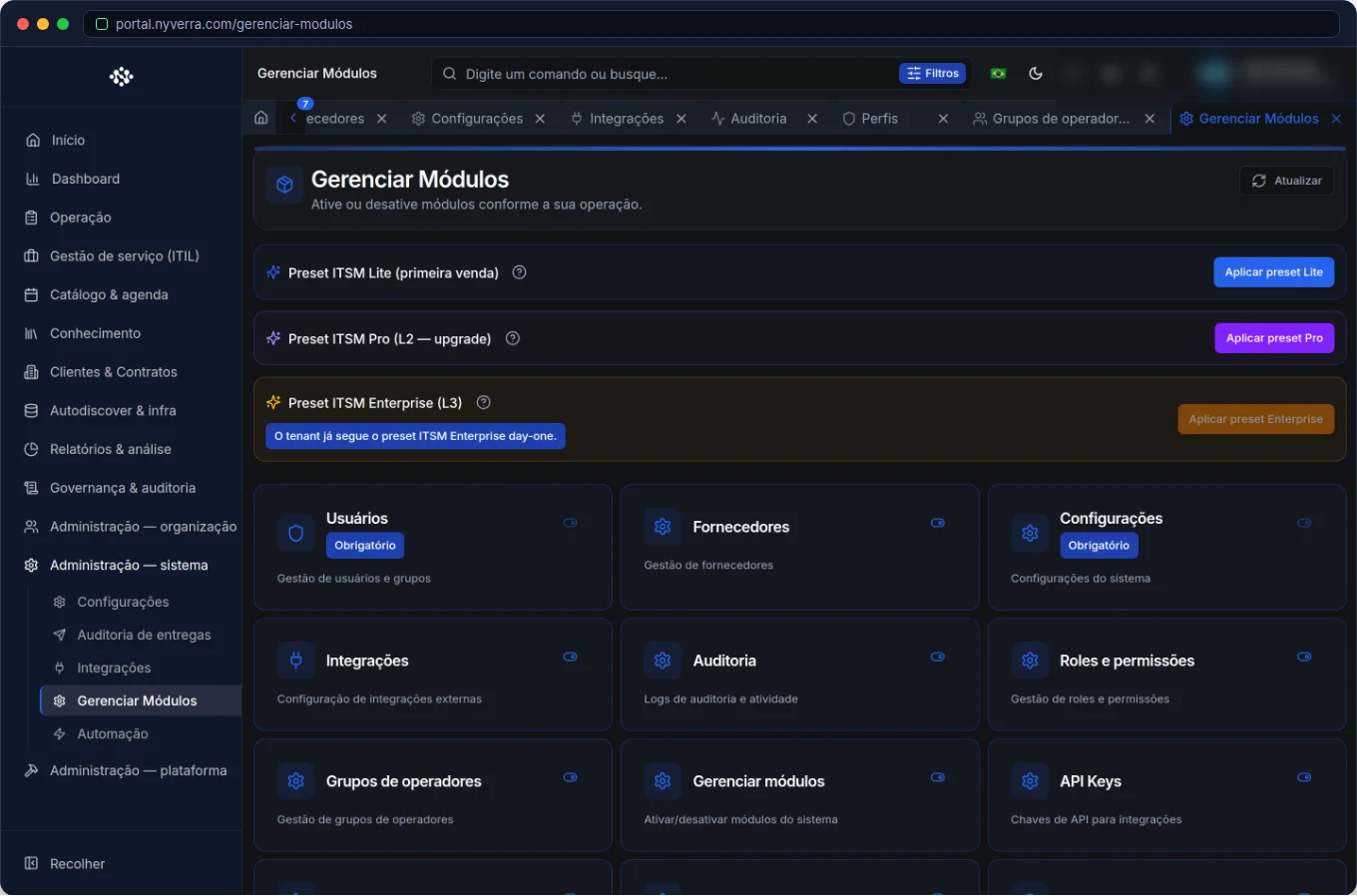 Module interface in the Nyverra ITSM Portal.
What is a Module
A module is a functional block of the system with its own code — Tickets, Problems, Changes, KB, Catalog, CMDB, Reports, among others. When a module is active, it appears in menus and APIs according to user permissions; when it is deactivated, it disappears from navigation — reducing noise and exposure surface.
The Portal organizes the module catalog into categories (Support, CMDB, Clients, Reports, Administration, Governance), which helps understand what each one delivers.
Presets: Lite, Pro and Enterprise
To avoid building the set from scratch, the product defines commercial presets that group modules by maturity and contract profile:
| Preset | Idea |
|---|---|
| Lite | Essential core of support and management |
| Pro | Lite + additional ITIL modules/records |
| Enterprise | Pro + advanced features (reports, expanded CMDB, etc.) |
The logic is incremental: each level adds capabilities to the previous one. Thus, the company starts lean (Lite) and evolves to Pro and Enterprise as maturity grows — without changing tools.
Consistent Gating
Enabling/disabling a module has a consistent effect on the product: menu items and screens/routes respect the module state. This is called gating — and it ensures that turning off a module really removes it from the experience, avoiding "ghost menus" or routes accessible by direct URL.
Core Modules
Some modules are essential and cannot be deactivated (for example, those that support basic administration and configuration). This protection prevents a click from leaving the instance without the minimum management functions.
Who Uses It
| Profile | Use |
|---|---|
| Administrator | Activate/deactivate modules according to the company profile |
| Manager | Decide, with sales, which preset to adopt |
How to Use: Step by Step
- Define the operation's profile (essential? full ITIL? enterprise?).
- Open Administration → Manage Modules.
- Activate the modules of the corresponding preset.
- Deactivate what is not used — less noise in the menu.
- Communicate to the team about the active modules.
- Review as maturity evolves (Lite → Pro → Enterprise).
Business Rules
| Rule | Explanation |
|---|---|
| Global effect | Activation/deactivation applies to the instance (tenant). |
| Complete gating | Deactivated module disappears from menu and routes consistently. |
| Core modules | Cannot be deactivated (instance protection). |
| Permissions | Even when active, a module only appears for those who have permission to see it. |
Best Practices
- Start lean: enable the essential and evolve by need.
- Communicate the activation of new modules to users (adoption depends on discoverability).
- Align the preset with the commercial contract — avoid promising what is not enabled.
- Reevaluate rarely used modules: turning them off can improve focus.
- Document which modules are active and why.
Common Mistakes
| Situation | What to Do |
|---|---|
| Cluttered menu | Disable unused modules. |
| "We turned everything on and nobody uses it" | Adopt presets and enable by need. |
| Trying to deactivate a core module | Not allowed — it's instance protection. |
Frequently Asked Questions
Does deactivating a module delete its data?
No — it only removes it from navigation/routes; the data remains.
Can I enable modules outside my preset?
Yes, the management allows activating individually.
Why doesn't an active module appear to me?
Probably your profile lacks permission.
Automate via API
Modules are exposed via API (/api/modulos, incl. enable/disable and the list of active ones). Reference at developer.nyverra.com.
Use Cases: Enabling What Makes Sense
1. Beginner operation (Lite). A company starting to structure the service desk enables the essential core: Tickets, KB, Clients. Fewer menus, more focus — and adoption happens naturally.
2. Mature operation (Enterprise). With consolidated ITIL processes, CMDB, changes, releases, and advanced reports are activated. The platform grows with maturity, without changing tools.
3. End of project. After a specific task is finished, the module used only at that time is deactivated — the interface becomes lean again for the rest of the operation.
Management Best Practices
| Practice | Benefit |
|---|---|
| Start lean | Faster adoption |
| Communicate activations | Discoverability of features |
| Align preset to contract | Without promising what is not enabled |
| Review rarely used modules | Operational focus |
| Document what is active | Clarity for support and admin |
What "Deactivating" Means (and Doesn't Mean)
Deactivating a module does not delete data: it exits navigation and routes consistently (gating). Records remain — reactivating brings everything back. Core modules are protected and cannot be deactivated, ensuring the instance never loses the minimum administration functions. It is flexibility with security: adapts the offering to the profile without risk of losing information.
Module Checklist
- Define the profile (Lite/Pro/Enterprise).
- Activate the preset modules.
- Deactivate what is not used.
- Communicate activations to the team.
- Align active modules with the contract.
- Review periodically.
Additional Frequently Asked Questions
Does deactivating delete data?
No; it only removes from navigation/routes.
Why can't I deactivate a module?
Probably it's a core module, protected.
What if I activate something nobody uses?
Deactivate it later — keeping it lean improves adoption.
Conclusion
Managing modules keeps the Nyverra ITSM Portal simple for those who use it and aligned with what is contracted. With Lite/Pro/Enterprise presets, consistent gating, and core module protection, the platform grows along with the operation's maturity.
Keep reading
Read also

StorCLI - Complete Cheat Sheet
StorCLI is the official and modern tool for managing Broadcom/LSI RAID controllers. This guide covers essential commands, syntax and use cases.
12 min de leitura Tutoriais
Business Services in Nyverra Portal: Translating IT into Business
The business doesn't feel a server go down — it feels email stop. The Business Services (Service Mapping) module of Nyverra ITSM Portal connects services like Email, ERP or PACS to CMDB assets, revealing the real impact of each failure.
5 min de leitura Segurança
RPO vs RTO: How to Define Before Buying Backup (and Why Most Companies Get It Wrong)
Most companies buy backup asking the wrong question: "how much does it cost?". The right question is: how much data can I lose (RPO) and how long can I be down (RTO). Discover how to define these numbers per system and avoid purchasing protection based on price, not on real need.
9 min de leitura
Comments
No comments yet
Be the first to share your thoughts on this article.


Leave a comment