

There is a type of ticket that every support team knows by heart: “you didn't notify me”. Sometimes the email went to spam; sometimes the message really failed; sometimes it was sent and read. The difference between “thinking” and “knowing” lies in the Delivery Audit of the Nyverra ITSM Portal.
This guide explains what the module records, what it is used for on a daily basis, and how to use it for diagnosis and compliance.
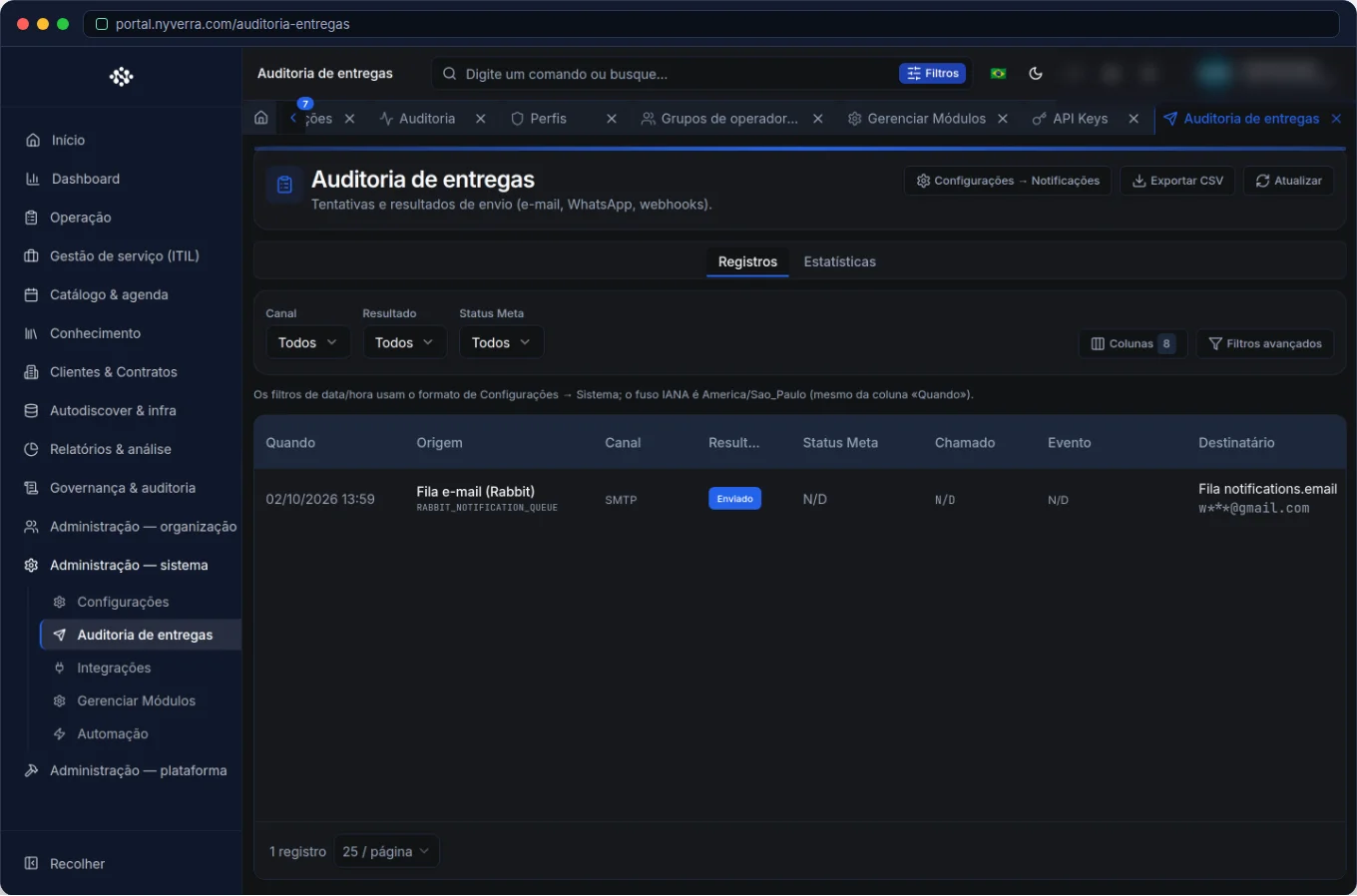 Module interface in the Nyverra ITSM Portal.
What is the Delivery Audit
It is the record of the notifications triggered by the Portal: recipient, channel (email, chat, push), template used, and delivery status. Instead of a “guess” about what went out, there is a searchable history.
| What it records | What it is used for |
|---|---|
| Recipient and channel | To know to whom and through which channel it was sent |
| Template | To identify which communication was triggered |
| Delivery status | Success or failure |
| Date/time | To correlate with ticket events |
Why it matters
- Diagnosis: resolve the “I didn't receive it” with evidence (sent? failed? what status?).
- Reliability: detect recurring delivery failures (e.g., misconfigured SMTP).
- Compliance: prove that a mandatory communication was triggered.
- Quality: adjust templates and recipients based on what fails.
Who uses it
| Profile | Typical use |
|---|---|
| Administrator | Investigate failures and validate email configuration |
| Operations | Confirm whether a customer notification was sent |
| Compliance | Prove mandatory communications |
How to use: step by step
- Open the Delivery Audit.
- Filter by recipient, notification type, and period.
- Investigate deliveries with failure first.
- In case of email error, validate the SMTP in Settings/Integrations.
- Use it in the diagnosis of “notification not received” before resending.
- Export when you need evidence.
Business rules and precautions
| Point | Explanation |
|---|---|
| Sensitive data | Contains recipients — treat according to LGPD and restrict access. |
| “Sent” ≠ “read” | The status indicates technical delivery, not human reading. |
| Retention | Define how long the history is kept. |
| Correlation | Use together with the ticket/event that generated the notification. |
Best practices
- Monitor recurring failures and fix at the source (SMTP, template, invalid recipient).
- Before claiming “we sent it”, confirm in the audit.
- Adjust templates and recipient lists based on what fails.
- Combine with the notification rules: right message, right channel, right time.
- Export evidence for compliance when necessary.
Common errors
| Situation | What to do |
|---|---|
| “I didn't receive the email” | Check the audit: sent? went to spam? invalid code? |
| Mass failures | Check SMTP/sender and domain reputation. |
| Wrong notification | Review templates and trigger rules. |
Frequently asked questions
Does the audit guarantee that the customer read it?
No — it indicates technical delivery, not reading.
Does it serve as proof of compliance?
Yes, with date/time and recipient, it is evidence of communication.
Does it help configure email?
Yes: systematic failures point to SMTP/template problems.
Automate via API
The audit is exposed via API (/api/notificacao-entregas and related endpoints), with filters and export. Reference at developer.nyverra.com.
Use scenarios: ending the “I didn't receive it”
1. Quick diagnosis. The customer says they did not receive the notification. The audit shows whether the notification went out, through which channel, and with what status — before blindly resending.
2. Mass failure. Dozens of deliveries fail suddenly; the pattern points to an SMTP/sender problem, not the recipient. Fix the cause, not the symptom.
3. Communication proof. In a compliance process, it is necessary to prove that a mandatory notification was triggered. The audit provides date, recipient, and status.
Deliverability KPIs
| Indicator | What it reveals |
|---|---|
| Failure rate per channel | Health of the sending infrastructure |
| Failures per template | Problematic templates |
| Invalid recipients | Quality of records |
| Time between event and sending | Notification delay |
Integration with notification rules
The audit closes the loop together with the notification rules (what triggers), the templates (the content), and the SMTP (the output). When something does not arrive, the investigation goes through this chain in order: did the rule trigger? did the template render? did the SMTP accept? did delivery occur? Showing this path is what transforms “I didn't receive it” from a discussion into a diagnosis with a resolution deadline.
Notification checklist
- Configure and test SMTP.
- Review templates and recipients.
- Monitor recurring failures.
- Define clear notification rules.
- Check the audit before resending.
- Have a history retention policy.
Additional frequently asked questions
Does “sent” guarantee reading?
No; it indicates technical delivery.
How to identify an SMTP problem?
Through systematic failures in the delivery audit.
Does it serve as compliance?
Yes, with date and recipient.
Conclusion
With the Delivery Audit, the Nyverra ITSM Portal proves that it communicated — and quickly corrects when it did not. Less time discussing what “maybe” was sent and more time solving what really matters.
Keep reading
Read also

StorCLI - Complete Cheat Sheet
StorCLI is the official and modern tool for managing Broadcom/LSI RAID controllers. This guide covers essential commands, syntax and use cases.
12 min de leitura Tutoriais
Business Services in Nyverra Portal: Translating IT into Business
The business doesn't feel a server go down — it feels email stop. The Business Services (Service Mapping) module of Nyverra ITSM Portal connects services like Email, ERP or PACS to CMDB assets, revealing the real impact of each failure.
5 min de leitura Segurança
RPO vs RTO: How to Define Before Buying Backup (and Why Most Companies Get It Wrong)
Most companies buy backup asking the wrong question: "how much does it cost?". The right question is: how much data can I lose (RPO) and how long can I be down (RTO). Discover how to define these numbers per system and avoid purchasing protection based on price, not on real need.
9 min de leitura
Comments
No comments yet
Be the first to share your thoughts on this article.


Leave a comment