

When a server goes down, the important question is not “what is the machine model”, but “what depends on it”. The CMDB (Configuration Management Database) exists to answer that: what the organization has, how the pieces connect, and what the impact is when something fails.
This guide covers the Assets and CMDB module of Nyverra ITSM Portal: the inventory of Configuration Items (CIs), the relationships between them, use in tickets and changes, checkout/checkin, QR code and automatic discovery.
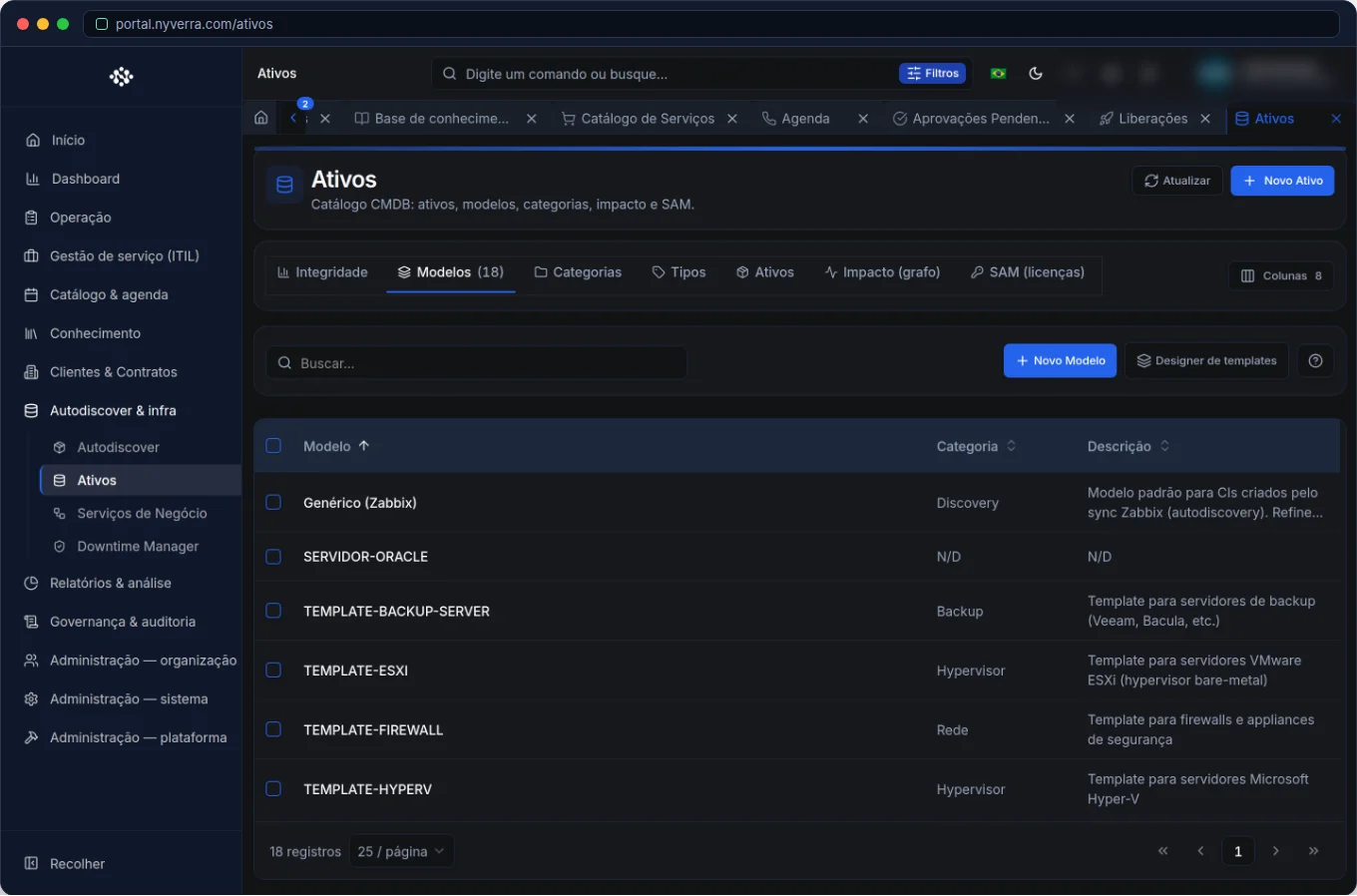 Module interface in Nyverra ITSM Portal.
What is CMDB (and why it's not just a spreadsheet)
A spreadsheet lists assets. A CMDB relates assets and services throughout the lifecycle. The difference appears at incident time: with the CMDB, you know that application X runs on server Y, which supports business service Z — and therefore an alert on Y is actually a business risk.
Each record is a CI (Configuration Item): server, application, network link, equipment, service. The CI accumulates attributes (identification, type, client, location), relationships and attachments.
Who uses
| Profile | Usage |
|---|---|
| Infrastructure / CMDB technician | Register assets and relationships, import inventory |
| Manager | Impact map and indicators |
| Service desk | Link the affected asset to the ticket |
| Client | Generally limited or no view |
Module features
Asset inventory
Registration of assets with identification, type, client and location. Filters by client, type and search help navigate large databases — and lists usually require filtering (client scope or global permission).
Relationships and impact
The CMDB → Impact sub-tab shows dependencies: what this CI consumes, what it supports, and aggregated indicators. It is the basis for impact analysis in incidents, problems and changes — and for maps displayed in client details.
Attachments and documentation
Each asset stores documentation: diagrams, credentials (visible only to those with permission), supplier contracts. Asset knowledge stops being scattered in loose folders.
Checkout / checkin
For physical assets or items under temporary possession, checkout records responsibility by an operator, and checkin records the return. This ensures traceability of who has what.
QR code
QR identification speeds up field operations: the technician scans the equipment and goes straight to the CI record — natural use in the mobile app.
Automatic discovery (Autodiscover)
Keeping inventory manually is unsustainable. Autodiscover receives inventory automatically (for example, via a lightweight CMDB discovery agent), keeping the CMDB updated without constant manual effort.
How to use: step by step
- Model asset types and start with critical CIs.
- Register assets with identification, type and client.
- Define relationships between CIs (application → server → service).
- Link assets to tickets in Object/Location, to identify recurrence by equipment.
- Use Autodiscover to keep inventory fresh.
- Analyze impact in the dedicated sub-tab before risk changes.
Business rules
| Rule | Explanation |
|---|---|
| Client scope | Many lists require filtering by client or having global permission. |
| Credentials | Sensitive fields are hidden without specific permission. |
| Deletion | Critical assets may have extra protection; there is trash and restoration according to profile. |
| Export | Some exports require a selected client. |
| Client map | In client details, the infrastructure tab can show the CMDB map of that organization. |
Best practices
- Standardize names and use stable IDs (UUID) for integrations.
- Keep relationships up to date — without them, the impact of a failure is invisible.
- Link tickets to the asset: this reveals which equipment generates more incidents.
- Prefer automatic discovery over manual updating in large databases.
- Protect asset credentials with specific permission and follow LGPD (Brazilian data protection law).
Common mistakes
| Situation | What to do |
|---|---|
| Outdated CMDB | Enable Autodiscover and set periodic reviews. |
| Island asset, without relationship | Register dependencies; without them there is no impact analysis. |
| Duplicate CIs | Search before creating; use stable IDs for integrations. |
Frequently asked questions
Does CMDB store only hardware?
No. It stores applications, services, links, locations — everything that makes up a service.
What is checkout for?
To record who is in temporary possession of an asset, ensuring traceability.
Do I need to fill everything by hand?
No — Autodiscover imports inventory automatically.
Automate via API
Assets and CMDB are exposed via API (/api/ativos, /api/cmdb, relationships and public discovery ingestion at /api/public/cmdb/discovery/{clienteId}/agent-light/report). Reference at developer.nyverra.com.
Use scenarios: CMDB solving real problems
1. Impact of a failure. A database server goes down. Thanks to the relationships, it is known in seconds which applications stop and which business services are affected — and incident priority is no longer guessing.
2. Change planning. Before changing a firewall, one checks what depends on it. Impact analysis avoids the classic “change that brought down something nobody remembered existed”.
3. Recurrence by equipment. By linking tickets to the asset, it is discovered that the same server generates 40% of incidents — a clear sign that the problem is the equipment, not the operation.
4. Field inventory. The technician scans the QR code of an asset and reaches the complete record, with history and attachments.
CMDB KPIs
| Indicator | What it reveals |
|---|---|
| Coverage (registered vs real assets) | Inventory completeness |
| Assets without relationship | Information islands |
| Recent update (last 90 days) | CMDB freshness |
| Incidents linked to assets | Use of CMDB in service desk |
| End-of-life assets | Renewal planning |
A CMDB with 50% accuracy is worse than none: decisions based on wrong data cost more than the absence of data.
Inventory governance
Keeping the CMDB alive requires routine: owner per asset type, periodic review and automatic discovery (Autodiscover) to reduce manual work. Integrate it with Service Mapping and changes — the inventory should be updated as part of the process, not as an isolated project. Without governance, the CMDB ages quickly and loses credibility.
CMDB implementation checklist
- Define asset types and start with critical CIs.
- Standardize names and IDs (UUID) for integrations.
- Map relationships (application → server → service).
- Enable Autodiscover to keep inventory fresh.
- Link assets to tickets and changes.
- Protect credentials with specific permission.
- Review the inventory periodically.
Additional frequently asked questions
How do I start if the inventory is outdated?
Prioritize critical assets, enable automatic discovery and expand gradually — don't try to register everything at once.
What is more important: attributes or relationships?
Relationships, because they give impact context. An isolated asset provides little information.
Who can see asset credentials?
Only profiles with specific permission; values are hidden from others.
Conclusion
The CMDB is the memory of the infrastructure and the basis for impact decisions. With inventory, relationships, QR, checkout and automatic discovery, the Assets module of Nyverra ITSM Portal transforms 'thinking I know what we have' into 'knowing exactly what depends on what'.
Keep reading
Read also

StorCLI - Complete Cheat Sheet
StorCLI is the official and modern tool for managing Broadcom/LSI RAID controllers. This guide covers essential commands, syntax and use cases.
12 min de leitura Portal ITSM
Business Services in Nyverra Portal: Translating IT into Business
The business doesn't feel a server go down — it feels email stop. The Business Services (Service Mapping) module of Nyverra ITSM Portal connects services like Email, ERP or PACS to CMDB assets, revealing the real impact of each failure.
5 min de leitura Segurança
RPO vs RTO: How to Define Before Buying Backup (and Why Most Companies Get It Wrong)
Most companies buy backup asking the wrong question: "how much does it cost?". The right question is: how much data can I lose (RPO) and how long can I be down (RTO). Discover how to define these numbers per system and avoid purchasing protection based on price, not on real need.
9 min de leitura
Comments
No comments yet
Be the first to share your thoughts on this article.


Leave a comment