

Every mature operation eventually runs into the same request: "integrate the portal with our system." Whether it's an import script, an external dashboard, or a monitoring connector, integrations need their own credentials — not an employee's password. That's what the API Keys of the Nyverra ITSM Portal are for.
This guide explains what they are, how scopes work, how to use them in the REST API, and why the Developer Portal is the integrator's starting point.
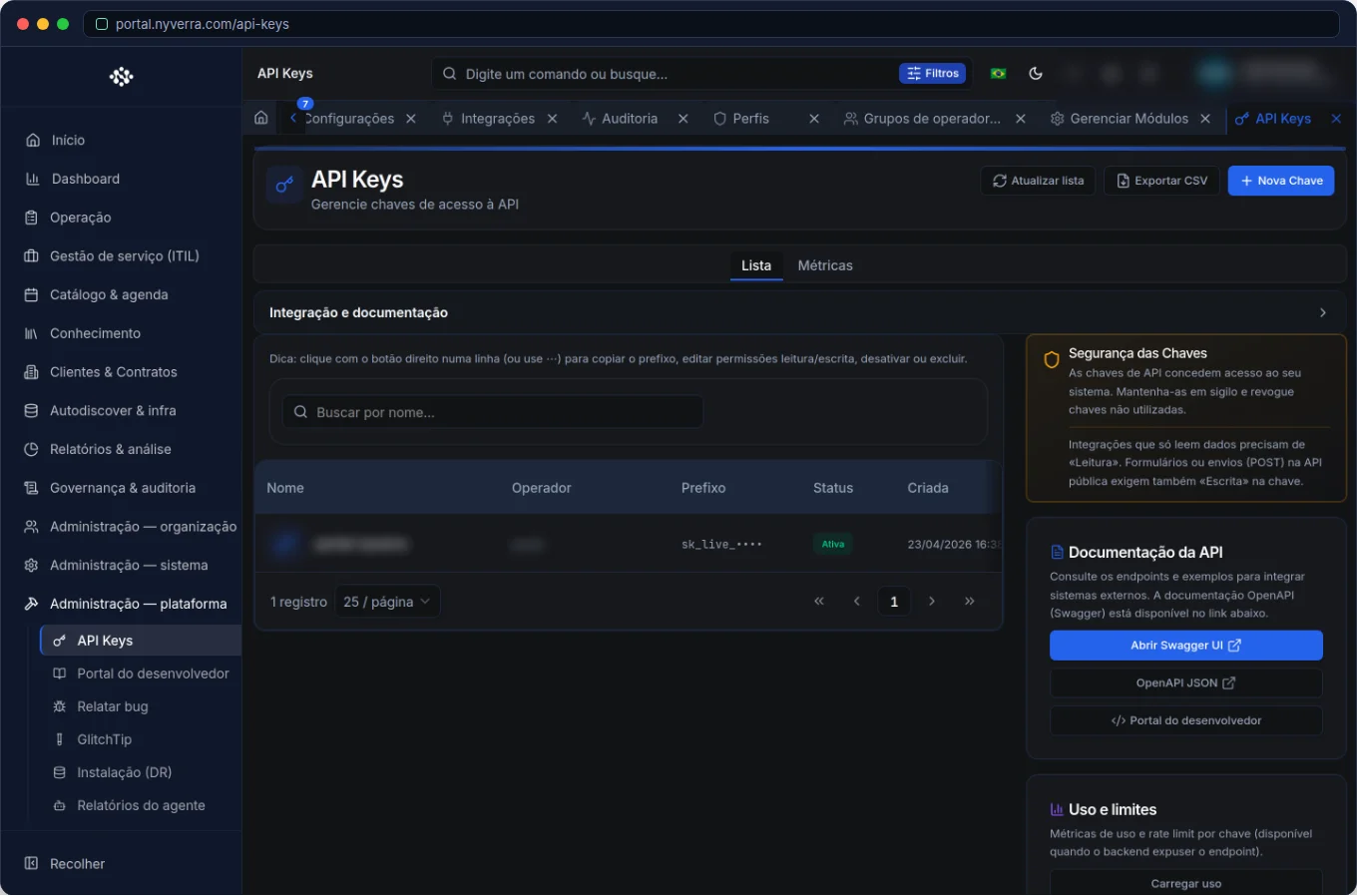 Module interface in Nyverra ITSM Portal.
What is an API Key
It is a credential that authenticates machine-to-machine (M2M) calls to the Portal API, without a user session. Instead of "logging in as someone," the integrating system presents the key and receives access according to the scopes granted.
This brings three immediate advantages: segregation (the integration is not a person), control (the key has limited scope), and traceability (actions remain associated with the key).
Scopes: what the key can do
A good API Key does not have full access — it has what is necessary. In the Nyverra Portal, operations are protected by scopes, for example:
| Scope | Allows |
|---|---|
posts:read / posts:write |
Read and create/update content |
taxonomy:read / taxonomy:write |
Read and create categories/tags |
media:write |
Upload files/media |
ai:generate |
Use content generation features |
posts:delete / posts:purge |
Delete (with and without recovery) |
Applying the least scope is what reduces the damage in case the key leaks.
How to use in the REST API
The API accepts the key in a header, generally as Authorization: Bearer <key> or X-API-Key: <key>. The Developer Portal (API documentation) brings together endpoints, parameters and examples — and, in the case of the blog, there is a dedicated interactive reference.
Who uses it
| Profile | Use |
|---|---|
| Developer / integrator | Consumes the API with the key |
| Administrator | Creates, scopes, deactivates and rotates keys |
How to use: step by step
- Create a key per integration (never one for everything).
- Apply the least scope necessary.
- Store in a secrets vault — never in code or Git.
- Use the key in the header of the calls.
- Monitor usage and rotate periodically.
- Revoke the key when deactivating the integration.
Business rules and security
| Rule | Explanation |
|---|---|
| One key per system | Makes it easy to revoke without affecting other integrations. |
| Least scope | Limits the impact of a leak. |
| Rotation | Reduce the exposure window; change keys periodically. |
| Never version | Keys in the repository are a leak waiting to happen. |
| Audit | Key usage must be logged and monitored. |
Best practices
- Treat the API Key as a sensitive credential: vault, not code.
- Rotate regularly and revoke idle keys.
- Use scopes to separate read from write and limit deletions.
- Prefer distinct keys per environment (staging ≠ production).
- Document which integration uses which key.
Common errors
| Situation | What to do |
|---|---|
| “The key can do everything” | Rescope: apply the least privilege. |
| Key in the repository | Revoke immediately and move to the vault. |
| Old forgotten key | Review and revoke unused keys. |
Error API_KEY_SCOPE_DENIED |
Missing scope for the operation; adjust the key. |
Frequently asked questions
Does an API Key replace user login?
For M2M integrations, yes; for human use, no.
Can I use the same key in two systems?
Technically yes, but it is bad practice — it makes it difficult to revoke and audit.
Where do I see the endpoints?
In the Developer Portal / REST API documentation.
Use cases: real integrations
1. Synchronization with external system. A nightly script imports data from another system using a key with read-only scope — reducing what a leak could expose.
2. Monitoring connector. Zabbix creates tickets via API with a dedicated write key, separate from any human credential.
3. Automation with agent. AI tools or reports use ai:generate and specific scopes, without access to deletions.
KPIs and key governance
| Indicator | What it reveals |
|---|---|
| Active keys per integration | Inventory of M2M accesses |
| Age of last rotation | Security posture |
| Keys with broad scope | Risk of excessive privilege |
| Keys without recent use | Candidates for revocation |
Response to exposed key incident
If a key leaks, time matters. The script: revoke immediately, create a new one with least scope, update the integration and investigate misuse through audit. Use separate scopes so that rotating one integration does not affect the others — and never version keys. Treating the API Key as a first-class credential is what allows the company to open the API without opening a security flank.
API Keys checklist
- One key per integration.
- Apply the least scope.
- Store in a secrets vault.
- Rotate periodically.
- Monitor usage.
- Revoke idle keys.
Additional frequently asked questions
Where to use the key?
In the Authorization or X-API-Key header of calls.
Can I use the same key in testing and production?
Better not; separate by environment.
What to do if it leaks?
Revoke immediately, create a new one, and investigate through audit.
Conclusion
With well-managed API Keys, the Nyverra ITSM Portal integrates securely without relying on human credentials. Least scopes, rotation, and audit turn “opening the API” into a controlled and sustainable integration.
Keep reading
Read also

StorCLI - Complete Cheat Sheet
StorCLI is the official and modern tool for managing Broadcom/LSI RAID controllers. This guide covers essential commands, syntax and use cases.
12 min de leitura Portal ITSM
Business Services in Nyverra Portal: Translating IT into Business
The business doesn't feel a server go down — it feels email stop. The Business Services (Service Mapping) module of Nyverra ITSM Portal connects services like Email, ERP or PACS to CMDB assets, revealing the real impact of each failure.
5 min de leitura Segurança
RPO vs RTO: How to Define Before Buying Backup (and Why Most Companies Get It Wrong)
Most companies buy backup asking the wrong question: "how much does it cost?". The right question is: how much data can I lose (RPO) and how long can I be down (RTO). Discover how to define these numbers per system and avoid purchasing protection based on price, not on real need.
9 min de leitura
Comments
No comments yet
Be the first to share your thoughts on this article.

Leave a comment