

There is an irony in the world of IT reports: the more useful they are, the more work they create. Collecting, assembling, formatting, and sending — every week. The Reports Agent in the Nyverra ITSM Portal exists to turn this cycle into an automatic operation, triggered by playbooks.
This guide explains what the module does, how to trigger and rerun reports, and why the execution history is essential for trusting the process.
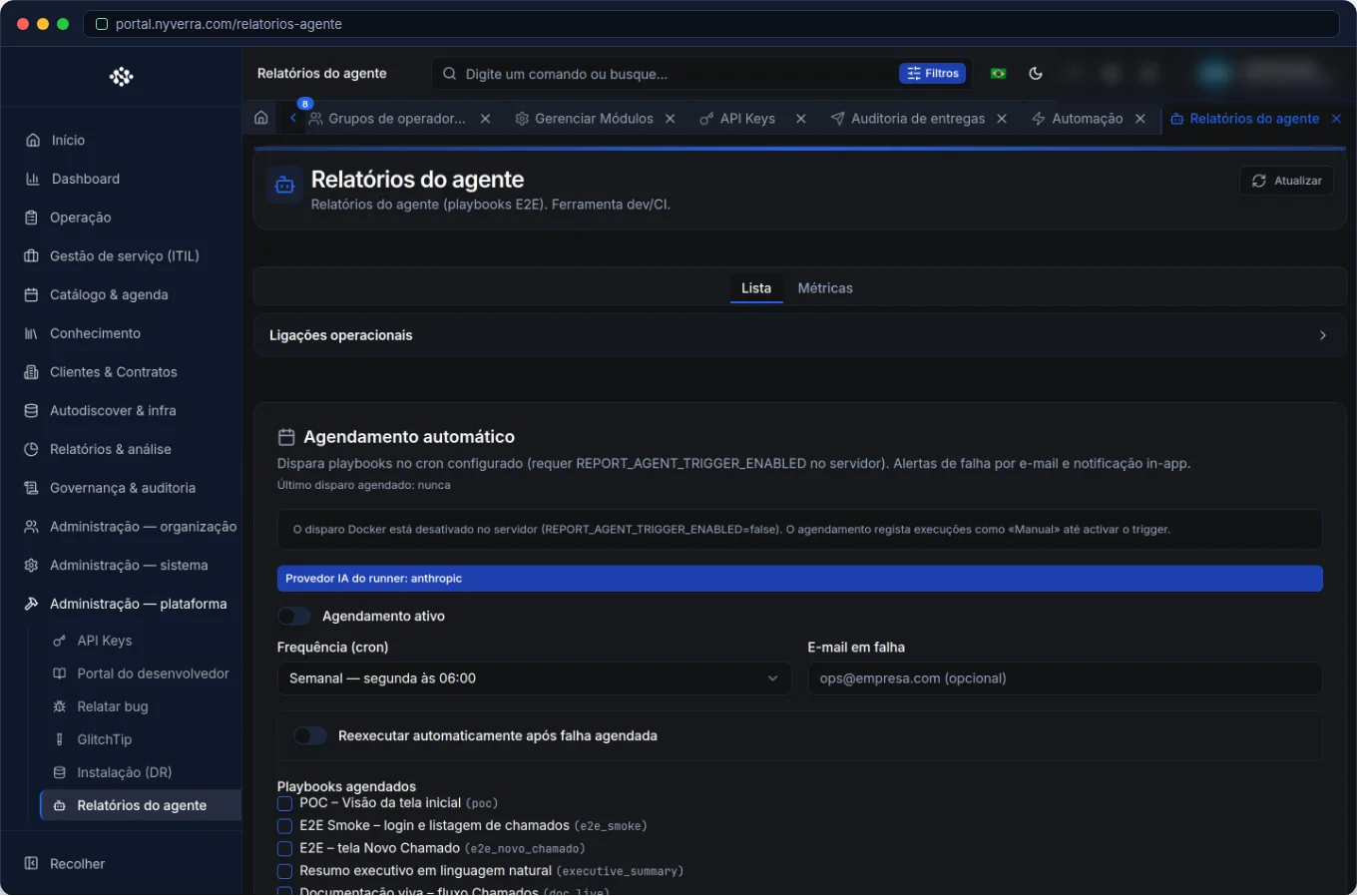 Module interface in the Nyverra ITSM Portal.
What is the Reports Agent
It is the Portal component that performs the report work: triggers a playbook (a generation script), assembles the reports, and records each execution. Instead of a person clicking "generate," the agent handles the cycle.
| Concept | What it is |
|---|---|
| Playbook | A script that describes what the agent should generate |
| Execution | One agent run (manual or scheduled) |
| History | Record of executions and their results |
Day-to-day use
- Recurring reports: generate the same data sets periodically.
- Distribution: integrate with scheduled reports and send by email.
- Rerun: redo a failed generation without waiting for the next cycle.
- Visibility: track what ran, when, and with what result.
Module features
| Feature | What it does |
|---|---|
| Trigger playbook | Starts an agent execution |
| Rerun | Repeats a specific generation |
| Execution history | Lists runs, statuses, and results |
| Integration | Connects to scheduled reports and report history |
Who uses it
| Profile | Typical use |
|---|---|
| Administrator | Configure the agent and playbooks |
| Manager | Receive recurring reports automatically |
| Operations | Rerun failed generations |
How to use: step by step
- Configure the agent and the reports it should produce.
- Trigger the playbook (or leave it scheduled).
- Monitor the executions in the module history.
- Rerun in case of failure or a specific need.
- Combine with scheduled reports for the distribution routine.
Business rules and precautions
| Point | Explanation |
|---|---|
| Failures | An execution may fail (data, permission, integration) — monitor it. |
| Rerun | Useful for recovering generations without waiting for the next cycle. |
| Data | The numbers reflect the database at the time of execution. |
| Window | Heavy generations should run during low-load hours. |
Best practices
- Monitor failures to avoid leaving reports silently pending.
- Use rerun to quickly recover a generation with an error.
- Combine agent + scheduled reports to automate delivery.
- Schedule heavy executions in a low-load window.
- Keep an inventory of which playbooks generate which reports.
Common mistakes
| Situation | What to do |
|---|---|
| Report did not arrive | Verify the execution history and the delivery audit. |
| Execution failed | Check the error and use rerun after fixing. |
| Slow generation | Reschedule to a lower-load time. |
Frequently asked questions
Does the agent replace scheduled reports?
It complements: the agent generates; the scheduling distributes.
Can I rerun just one report?
Yes, via the rerun action.
How do I know if it ran?
From the module's execution history.
Automate via API
The agent is exposed via API (/api/report-agent and related endpoints), allowing you to trigger and monitor executions. Reference at developer.nyverra.com.
Use cases: information on autopilot
1. Recurring reports. Every Monday, the playbook generates the week's reports and the scheduling delivers them. The manager starts the day with information, without anyone "assembling" anything.
2. Failure recovery. A generation fails due to an integration error. Once the problem is fixed, the rerun redoes the report without waiting for the next cycle.
3. Execution audit. The history shows what ran, when, and with what result — useful for proving that mandatory reports were generated.
Agent KPIs
| Indicator | What it reveals |
|---|---|
| Success vs. failure executions | Process reliability |
| Average execution time | Efficiency |
| Required reruns | Stability |
| Reports generated per period | Automation coverage |
How to operate the agent well
Monitor failures — a generation that fails silently is a report that "disappeared." Schedule heavy executions in a low-load window. Keep the inventory of which playbooks generate which reports. And combine with scheduled reports: the agent is the factory, scheduling is the delivery. Together, they eliminate the manual work that often turns "report management" into lost time every week.
Agent checklist
- Configure the playbooks and reports.
- Schedule or trigger manually.
- Monitor the execution history.
- Rerun in case of failure.
- Schedule heavy loads during low demand.
- Combine with scheduled reports.
Additional frequently asked questions
Does the agent replace scheduling?
It complements: the agent generates; the scheduling distributes.
How do I recover a generation that failed?
Via rerun.
Where do I see the result?
In the execution history and in the report history.
Conclusion
With the Reports Agent, the Nyverra ITSM Portal delivers information on autopilot. Less time assembling reports, more time using what they reveal — and a history that shows, with every execution, that the process worked.
Keep reading
Read also

StorCLI - Complete Cheat Sheet
StorCLI is the official and modern tool for managing Broadcom/LSI RAID controllers. This guide covers essential commands, syntax and use cases.
12 min de leitura Portal ITSM
Business Services in Nyverra Portal: Translating IT into Business
The business doesn't feel a server go down — it feels email stop. The Business Services (Service Mapping) module of Nyverra ITSM Portal connects services like Email, ERP or PACS to CMDB assets, revealing the real impact of each failure.
5 min de leitura Segurança
RPO vs RTO: How to Define Before Buying Backup (and Why Most Companies Get It Wrong)
Most companies buy backup asking the wrong question: "how much does it cost?". The right question is: how much data can I lose (RPO) and how long can I be down (RTO). Discover how to define these numbers per system and avoid purchasing protection based on price, not on real need.
9 min de leitura
Comments
No comments yet
Be the first to share your thoughts on this article.


Leave a comment